





KEY TAKEAWAYS
Managing access across dozens, sometimes hundreds, of applications creates friction for users and complexity for security teams. Each additional login introduces another password to manage, another policy to configure, and another potential point of failure.
This challenge is why many organizations turn to single sign-on (SSO). Once adopted, the next question is often how does SSO work, especially from a security and operational perspective. SSO changes where authentication happens, how access is enforced, and where risk is concentrated.
How Does Single Sign-On Work? Understanding the Core Mechanics
At its core, SSO allows a user to authenticate once and access multiple applications without re-entering credentials. Rather than each application managing authentication independently, trust is delegated to a centralized identity system known as an identity provider (IdP).
In SSO terminology:
- The IdP authenticates the user.
- The service provider (SP) is the application the user is trying to access.
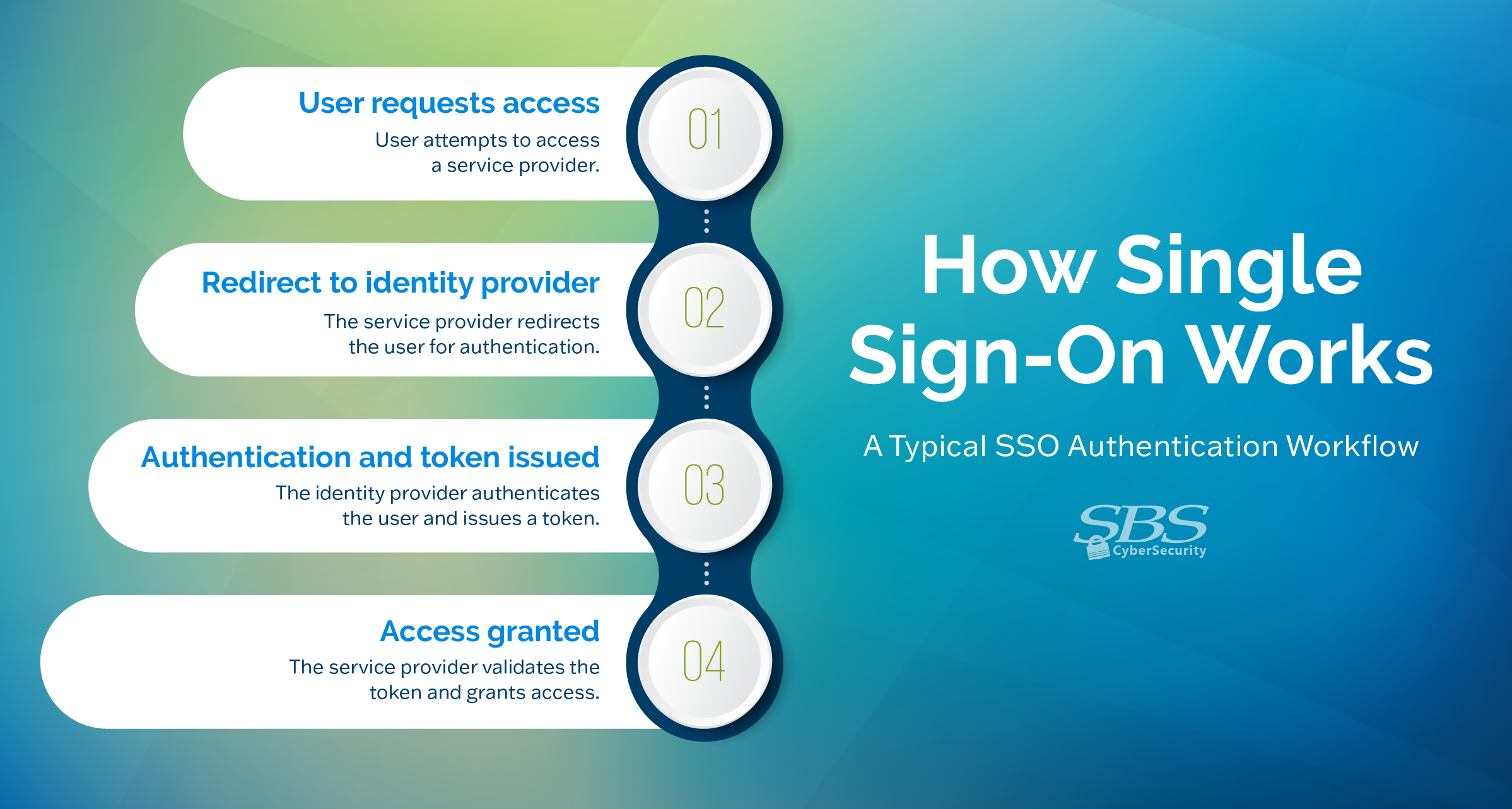
A typical SSO flow includes four steps:
- A user attempts to access an SP, such as a cloud app.
- The SP redirects the user to the IdP.
- The IdP authenticates the user and issues a secure authentication token.
- The SP validates the token and grants access.
The critical distinction from traditional logins is that user passwords are never shared with individual applications. Applications rely on the IdP to confirm that authentication has already occurred.
Common SSO Protocols
Several standardized protocols support this model:
- Security Assertion Markup Language (SAML): The most widely adopted protocol in enterprise environments and supported by the majority of business applications
- OpenID Connect (OIDC): A modern identity layer built on OAuth 2.0 and commonly used by both consumer and enterprise SaaS platforms.
- WS-Federation: Primarily used in Microsoft-focused environments, including ADFS and Microsoft Entra ID.
All of these protocols rely on token-based authentication across platforms. This approach reduces repeated logins, minimizes password fatigue, and gives IT and security teams a single place to enforce authentication policies.
Important clarification: SSO should not be confused with a password manager, which stores and autofills usernames and passwords for applications. SSO removes the need for applications to handle passwords at all by centralizing authentication through an IdP.
Types of Single Sign-On
SSO is not implemented the same way everywhere. How it works depends largely on whether an application is built for consumers or for business users.
Social SSO
Social SSO is common on consumer-facing platforms and allows users to sign in using accounts from providers such as Google, Facebook, or LinkedIn. It simplifies registration and login processes, but it is typically preconfigured by the service provider.
Because customization options are limited, social SSO rarely meets enterprise requirements for policy enforcement, logging, or regulatory compliance.
Enterprise SSO
Enterprise SSO is designed for internal business use and integrates with corporate identity systems. Employees use a single identity to access tools such as Microsoft 365, Salesforce, AWS, and other business-critical applications.
This approach centralizes identity management, supports granular access controls, and enables consistent enforcement of organization-wide security policies.
Why Single Sign-On Matters
SSO tends to gain adoption quickly because it addresses real problems for both users and security teams.
From a security standpoint, SSO reduces password fatigue by limiting users to one primary set of credentials. Centralizing authentication also allows organizations to enforce consistent controls rather than relying on whatever options individual applications happen to offer. This makes it easier to deploy stronger authentication methods, including phishing-resistant multifactor authentication or physical security keys, and reduces the overall attack surface.
SSO also improves operational efficiency. Password reset requests decrease, and user lifecycle management becomes simpler. Onboarding, offboarding, and access changes can be handled from a single system instead of across dozens of applications. As organizations grow, this model scales far more effectively than managing access application by application.
For users, the benefit is straightforward. Fewer logins mean less friction, quicker access to tools, and fewer interruptions during the workday.
SSO in a Cybersecurity Context
While SSO improves security in many areas, it also changes how risk must be evaluated.
Centralized Access and Risk Concentration
Because authentication is centralized, the identity provider becomes a critical control point. If an attacker compromises the IdP or successfully authenticates as a user, they may gain access to every connected application. This makes protecting the IdP essential to any SSO implementation.
For most organizations, this concentration of risk is outweighed by the security benefits of centralized enforcement. Maintaining strong controls in one place is often more effective than trying to ensure dozens of applications each enforce them correctly. The tradeoff is manageable if it is understood and planned for.
Compliance and Audit Considerations
SSO can improve compliance and audit readiness by enabling consistent authentication controls, centralized logging, and clearer reporting. Many applications provide limited options for authentication customization and audit logging, which can create gaps in regulated environments.
By shifting authentication to an IdP, organizations gain more uniform controls and audit visibility than most applications can provide on their own.
Dependence on the Identity Provider
SSO introduces dependency on the availability and integrity of the IdP itself. An outage or disruption can affect access across the organization, making contingency planning essential.
Most applications support emergency access options, often called break-glass accounts, and many IdPs offer failover configurations that can be tailored to an organization’s risk tolerance.
Securing Your SSO Environment
SSO is most effective when used as a foundation for layered security rather than a standalone control.
Enforcing Multifactor Authentication
Multifactor authentication (MFA) is critical for protecting centralized access. Phishing-resistant MFA and passwordless authentication provide the strongest protection. Physical security keys remain the most secure option for organizations that can support them.
Monitoring and Regular Security Reviews
Continuous monitoring and periodic access reviews help identify misconfigurations and risky access patterns. A capable IdP should support delegated access reviews and automated alerts for suspicious activity, such as logins from new devices or impossible travel scenarios.
User Awareness and Training
Users need to understand how SSO changes login behavior. Applications may prompt for an email address, but authentication should always occur through the IdP. Any application requesting passwords or MFA codes directly should be treated as a warning sign.
Providing managed bookmarks to the IdP application portal and training users to always launch applications from that portal reduces confusion and phishing risk.
Building Strong Identity Foundations
Single sign-on is no longer just a convenience feature. It is a foundational security control that shapes how access, risk, and resilience are managed across the organization. When supported by strong authentication, monitoring, and contingency planning, SSO becomes a powerful enabler of both security and operational efficiency.

Put Identity Strategy into Practice

Run a comprehensive assessment of your incident preparedness and get specific recommendations to enhance your readiness for the future.
Read More
Incident response plans are not one-size-fits-all. Get a customized plan that aligns with your industry regulations, business objectives, and specific security needs.
Read More